
Page History
A Lustre file system consists of a number of machines connected together and configured to service filesystem requests. The primary purpose of a file system is to allow a user to read, write, lock persistent data. Lustre file system provides this functionality and is designed to scale performance and size as controlled, routine fashion.
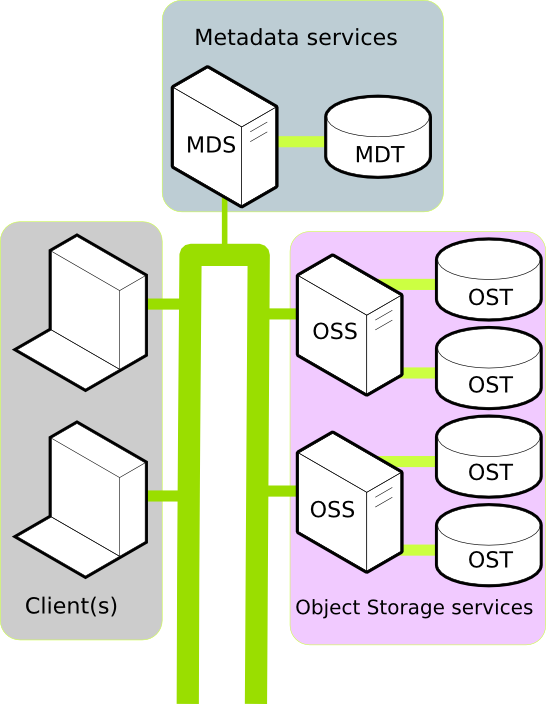
In a production environment, A Lustre filesystem typically consists of a number of physical machines. Each machine performs a well defined role and together these roles go to make up the filesystem. To understand why Lustre scales well, and to consider if Lustre is suitable in your use case, it is important to understand the machine roles within Lustre. A typical Luster installation consists of:
- One or more Clients.
- A Metadata service.
- One or more Object Storage services.
Client
A Client in the Lustre filesystem is a machine that requires data. This could be a computation, visualization, or desktop node. Once mounted, a Client experiences the Lustre filesystem as if the filesystem were a local or NFS mount.
Further reading:
Metadata services
In the Lustre filesystem metadata requests are serviced by two components: the Metadata Server (MDS, a server node) an Metadata Target (MDT, the HDD/SSD that stores the metadata). Together, the MDS and MDT service requests like: Where is the data for file XYZ located? Do I have permission to write to file ABC?
All a Client needs to mount a Lustre filesystem is the location of the MDS. Currently, each Lustre filesystem has only one active MDS. The MDS persists the filesystem metadata in the MDT.
Further reading:
Object Storage services
Data in the Lustre filesystem is stored and retrieved by two components: the Object Storage Server (OSS, a server node) and the Object Storage Target (OST, the HDD/SSD that stores the data). Together, the OSS and OST provide the data to the Client.
A Lustre filesystem can have one or more OSS nodes. An OSS typically has between two and eight OSTs attached. To increase the storage capacity of the Lustre filesystem, additional OSTs can be attached. To increase the bandwidth of the Lustre filesystem, additional OSS can be attached.
Further reading:
Networking
Lustre uses LNET to configure and communicate over the network between clients and servers. LNET is designed to provide maximum performance over a variety of different network types, including InfiniBand, Ethernet, and networks inside HPC clusters such as Cray XP/XE systems.
Further reading:
Tools
A Lustre filesystem uses modified versions of e2fsprogs and tar. Managing a large Lustre filesystem is a task that is simplified by community and vendor supported tools. Details of these tools are available at the COMMUNITY PAGE OF THE WIKI
Further reading
- Notes from the Lustre Centre of Excellence at Oak Ridge National Laboratory
- Understanding Lustre Filesystem Internals white paper from National Centre for Computational Sciences.
Bird's eye view
Luster consists
The following are recommendations regarding specifications for Lustre OSS and MDS server nodes. These recommendations are based on use with Lustre 1.8.X and Lustre 2.0 releases. Lustre 2.1 is planning to have SMP scaling enhancements to address the issues currently limiting Lustre’s use of more sockets, cores and threads.
Today, the most common versions of Lustre in the field would be 1.8.X, 1.6.X and 2.0. In all of these releases we are faced with SMP scaling issues that limit the number of cores and threads we can effectively use. With heavy loads there comes a point, due to locking issues, where having too many cores and threads actually creates a bottleneck situation that makes having more cause your performance to go down instead of up.
This is because the threads spend more time trying to acquire certain locks in contention with other threads than they spend actually accomplishing any real work.
For this reason, in the field, we turn off hyper-threading to reduce lock contention and even at that we find that having more than 8 cores still degrades performance.
We have found that 2 socket motherboards are currently the ideal for the currently available Lustre releases. Two sockets are better than one, but going to four socket boards simply gets you to the too many cores and threads problem quicker.
Based on the current releases of Lustre, we recommend two socket mother boards and a maximum of 8 cores per CPU socket.
SMP scaling enhancements are scheduled to land in the Lustre 2.1 release to address these issues. The Lustre 2.1 release is scheduled to be released at the end of Q2, 2011. So, if you think it may be a while before you would move to the Lustre 2.1 release, we would recommend that you opt for higher CPU speeds with a maximum of 8 cores, as opposed to lower CPU speeds and 12 or 16 cores, as well as more than 2 sockets. The reason being that 2 socket 8 core CPU’s work well with the current Lustre releases and any SMP scaling enhancements done for 2.1 would help these configurations too. So, this would allow you to attempt to move to the 2.1 release when you are ready, but have the ability to revert back to an earlier release should you run into a problem on the 2.1 release.
As far as current technology allows, we have not found a case where the OSS server’s CPU ever got near 100% utilization even when we tried to put as much load on them as possible.
PCI slots
If you are confined to using a 1U blade for an OSS or MDS server, then you probably do not have many options with regards to the number of PCI slots you have. Most of these compact servers will have a maximum of three PCI slots and you will likely need one for a Fibre Channel or InfiniBand card to connect to your backend storage, one for an Ethernet or InfiniBand card to connect to your network switch, and one for internal disks. Certainly, depending on the motherboard used, there are exceptions to this.
However, if you are using rack mount servers, where you likely have quite a bit of latitude in deciding what server to use for an OSS or MDS node, then the number of PCI slots allows you more flexibility. A typical rack mount server will have 6 PCI slots and some higher end servers have 10 PCI slots. The key thing to make sure of is whether all the PCI slots are a full 8 lane (PCIx8) or 16 lane (PCIx16) slot, whatever it is that you need. Many servers will claim that they have 6 full PCIx8 slots, but further inspection will find that four really are, but two are shared. So, if you need all six slots at full bandwidth all at the same time, then you will be bottlenecked on the two that are being shared because whatever card is plugged into the shared slots will be getting half the bandwidth of the slots which are not shared.
Another common problem is that even though the Architect may know of this limitation, and therefore design for the use of only the full PCIx8 slots, the people who actually assemble the hardware are not likely to read the instructions closely enough to make sure the right cards get plugged into the correct slots. So, you can avoid some nasty performance debugging issues if you can find servers with no shared PCI slots.
Memory Requirements
For the MDS servers you would like to have as much memory as you can afford so that you can cache as much as possible in the MDS server. But, the cost to jump to higher GB DIMMs can be prohibitive. We routinely use 48 GB, or 24GB per core for MDS servers and this combination works very well. If you can afford higher amounts of memory then that should be even better.
For the OSS servers, prior to Lustre 1.8 which introduces OSS read caching, 16 GB or 8GB per core was usually more than sufficient for an OSS server. So, if your environment is primarily a write heavy environment, or if all you care about is the write speed, then 16 GB of memory per OSS server should still be fine. On the other hand, if you think your environment will be able to make use of the OSS read caching, then bumping the OSS server memory up to 48 GB can greatly improve your read performance.
Sources
...
Overview
Content Tools